Your Go-To nbn® Guide: What You Need To Know
Jun 2025
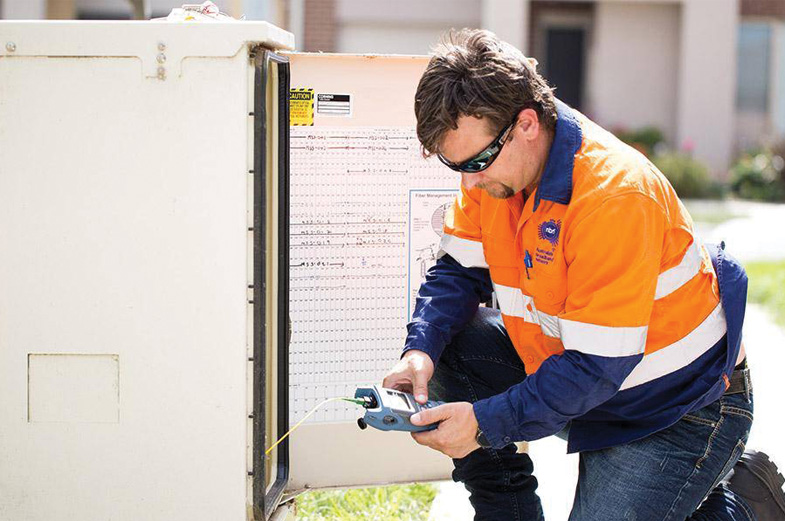
From being just an optional service, having a reliable internet connection has become an absolute necessity in our increasingly digital era. Despite this, some regional areas in Australia are still dealing with less-than-ideal internet services.
The nbn® was established to solve this, offering Australians improved and consistent internet speeds. Many regional homes have embraced the nbn®, but understanding its full benefits can be complex. As a leading retail service provider of nbn®, Skymesh provides this comprehensive article titled ‘Your Go-To nbn® Guide: What You Need To Know’, covering all important information about nbn®.
According to a recent nbn commissioned survey in 2025, approximately 42% of residential consumers who use nbn as their main internet service at home haven’t modified their home setup in the past five years.* This is particularly significant because your in-home configuration fundamentally shapes your internet experience, often having greater impact on performance than the specific plan you’ve purchased.
See what’s available at your property
Skymesh is dedicated to bridging the digital divide for regional Australia. Boasting over twenty years of experience, we provide broadband solutions suited to the unique demands of homes and businesses in regional Australia. We pride ourselves on providing seamless connectivity, excellent customer service, and flexible plans at an affordable price.
Understanding the nbn® network
Think about how essential the internet has become; it’s become an important part of our day to day. However, not all internet connections are the same. The speed and stability of one’s internet can impact everything, from how businesses run to how students learn.
Now, imagine a future where Australians can enjoy the internet access and connectivity they truly deserve. This vision is what the nbn® aims to achieve. The nbn® network was developed to enhance internet access for regional Australians, providing better opportunities for internet speed and reliability.
While the nbn® network provides the connection to your property, the foundation of your internet experience starts with you. Your in-premises configuration directly impacts the speeds and performance you’ll experience, regardless of your nbn plan.
There are different connection types and speed tiers, depending on factors like your location and existing infrastructure, so it’s crucial to understand which one is available for you.
Different nbn® connection types
nbn® uses a mix of different technologies across Australia:
- Fibre to the Premises (FTTP). This connection type involves running a high-speed fibre optic cable directly to your home.
- Fibre to the Node (FTTN). With FTTN, a high-speed fibre optic cable is run to a central cabinet (node) in a neighbourhood. From the node, the existing copper phone lines are used to deliver the service to individual homes.
- Fibre to the Building (FTTB). This is mainly for apartment blocks and similar premises. A high-speed fibre optic cable is run to the building’s communications room, and existing technology takes it to individual apartments.
- Fibre to the Curb (FTTC). This is a newer technology where fibre is run closer to the home, typically to a telecom pit outside. From there, a copper line connects to the premises.
- Hybrid Fibre-Coaxial (HFC). This uses cable networks to reach your home as it combines fibre and coaxial cable.
- Fixed Wireless. This involves using data sent over radio signals and outdoor antennas to connect your premises to an nbn® network wirelessly.
- Sky Muster™ satellite connection. Connectivity is provided by two cutting-edge satellites in space and a satellite dish installed on your roof.
Keep in mind that each connection type has its advantages and limitations, and the type available to you generally depends on your location and the existing infrastructure.
Various nbn® speed tiers
The nbn®’s versatility isn’t just restricted to connection types; it offers different speed tiers to accommodate diverse needs. For fixed line connections, for example, the following speed tiers are available:
- nbn® 25: The typical evening speed for this tier is up to 25 Mbps download and up to 4 Mbps upload between 7.00 p.m. and 11.00 p.m., which is ideal for streaming, general browsing, and households with one to two active users.
- nbn® 50: Between 7.00 p.m. and 11.00 p.m., the typical evening speed for this tier is up to 49 Mbps download and up to 16 Mbps upload, which is ideal for HD streaming, social media, online gaming, and households with three to four active users.
- nbn® 100: This tier’s typical evening download and upload speeds are up to 96 Mbps and up to 16 Mbps, respectively, between 7.00 p.m. and 11.00 p.m., which is ideal for ultra-high-definition streaming, social media, online gaming, large file downloads, and households with over four active users.
Getting ready for the nbn® transition
Switching to the nbn® network is a big step for homes and businesses in Australia, especially for those in regional areas, as it could finally mean better and faster internet. But getting ready for this change needs some planning. Let’s break down what you need to do to get started.
Checking your eligibility
First, see if the nbn® network is available where you live. Check your address on the Skymesh platform. Just navigate our website and enter your address to find out if you can get the nbn® service. If you’re unsure or your place isn’t listed, get in touch with our team, and well do our best to help.
Preparing for installation
If you’re good to go for nbn®, the next step is installation. Make sure the space is clear for the nbn® installer to work. Move any furniture or items that might be in the way. This helps the nbn® installer set things up efficiently. Eligible users may be able to enjoy free standard installations (not including imposed nbn® charges).
During installation, the technician will set up your nbn connection box (formerly called the Network Termination Device or NTD), which serves as the gateway between the nbn network and your home setup. Take this opportunity to discuss optimal placement with the technician, considering where your router will be located for best coverage throughout your home.
Time to connect
Post-installation, the real test begins. After everything’s set up, connect your devices to the new network. Test it out and enjoy your upgraded internet experience.
Once connected, optimise your home setup for the best possible performance. Consider the following:
Strategic router placement: Position your router centrally in your home, away from concrete walls, metal objects, and electronic devices that can cause interference. This eliminates dead zones and maximises coverage throughout your property.
Router age considerations: If your router is more than 5 years old, it likely uses outdated technology that cannot fully support modern internet speeds and security protocols. Upgrading to a newer model can dramatically improve your experience without changing your plan.
Wi-Fi technology awareness: Newer Wi-Fi standards (Wi-Fi 5/6/6E) offer significantly better performance than older generations, but only when both your router and devices support them. When purchasing new equipment, check compatibility to ensure optimal connection speeds.
Connection type selection: While Wi-Fi offers convenience, wired connections provide stability and maximum speeds for gaming, streaming, and work applications. Consider using ethernet cables for devices that require consistent performance.
Network extension options: For larger homes, traditional Wi-Fi extenders have significant limitations, often creating separate networks and reducing overall speeds. Mesh systems provide seamless coverage by creating a unified network throughout your home, automatically connecting devices to the strongest signal.
Addressing common nbn® connection concerns
Running into issues with your nbn® connection? It can happen sometimes. To help you better overcome them, here’s a step-by-step guide to get you back online:
- Identify the issue: Begin by pinpointing the exact nature of the problem. Is it a drop in speed, intermittent connectivity, or a complete disconnection? Knowing the specific concern will help in resolving it more efficiently.
- Check your equipment: Ensure all your devices, including modems, routers, and connecting cables, are correctly set up and working. Sometimes, a mere restart or resetting of your modem can resolve minor glitches. Also check your router placement – even small adjustments to position can significantly improve coverage and performance. Keep it away from large metal objects, concrete walls, and electronic devices that might cause interference.
- Verify the speed: Test your internet speed using a reliable speed test website or application. Compare the results with the speed tier you’ve subscribed to, keeping in mind that during peak times, you might experience slightly lower speeds. If using Wi-Fi, try conducting the same test with a wired connection to determine if the issue is with your Wi-Fi distribution rather than your nbn connection itself.
- Seek external advice: Consider reaching out to external experts or forums. The nbn® community and various online platforms can offer advice, share similar experiences, or suggest alternative solutions.
- Contact your service provider: If you’ve checked the basics and the issue persists, get in touch with your provider. They can offer insights into any broader network issues or guide you on specific troubleshooting steps for your connection.
Frequently Asked Questions (FAQs)
How does the nbn® differ from previous broadband infrastructures?
Before the nbn®, Australia’s internet landscape was a mix of different outdated technologies. When the nbn® network was introduced, the goal was to replace nearly everything with brand-new fibre-to-the-home services.
Unlike older networks that mainly use copper cables, for example, Fixed Line nbn® connections primarily utilise fibre-optic cables, which can transmit data faster and more reliably over long distances. Keep in mind, however, that some technologies also use hybrid connections or still rely on existing copper cables as the last part of the connection, which can affect the speed and reliability of the nbn® service.
Are there hidden costs associated with the nbn®?
The nbn® network operates as a wholesale open-access data network on a national scale. To get it installed in your home, you may have to work with a retail service provider. Generally, there aren’t hidden costs tied to an nbn® setup, but it’s always advisable to choose reputable providers, such as Skymesh. We uphold transparency in costs associated with all the internet plans we offer.
What’s the influence of the nbn® on property valuations?
In today’s highly digitised society, a good internet connection is almost just as important as a good location. With that, homes with fast and reliable internet are in high demand by people looking to buy or rent. Because the nbn® network is ready for future tech changes and the growing need for data, homes connected to it are seen as modern, which can raise their price.
How important is my in-home setup to my nbn® experience?
Your in-home setup plays a crucial role in determining the quality of your nbn® experience. According to recent research, 42% of nbn users haven’t updated their setup in five years, potentially limiting their connection quality regardless of their plan.
Strategic router placement, using current Wi-Fi technology, choosing appropriate connection types for different activities, and implementing effective network extension solutions can significantly improve your internet experience without changing your plan or speed tier.
Learn the key setup tips that help you get the best performance from your home Wi-Fi, including equipment choices, placement basics, and simple ways to improve speed, coverage, and reliability.
Key Points to Remember
The nbn® network is designed to level the playing field for both urban and regional Australians when it comes to the accessibility of reliable internet connection services.
Your in-home setup is the foundation of your internet experience. Recent research shows 42% of nbn users haven’t updated their setup in five years*, potentially limiting their connection quality regardless of their chosen plan.
Offering a range of connection types such as FTTP, FTTN, FTTB, FTTC, HFC, Fixed Wireless, and Sky Muster™ satellite connection – the nbn® caters to a wide variety of internet connection needs depending on factors like location and pre-existing infrastructures.
nbn® provides a spectrum of speed tiers, each designed with specific user activities in mind, such as casual browsing, HD streaming, or intensive online gaming.
Making the shift to the nbn® network can be seamless and involves verifying your area’s eligibility, preparing your premises for installation, and conducting post-setup tests.
Equipment optimisation is essential for maximum performance:
- Position your router centrally, away from interference sources
- Consider upgrading routers older than 5 years
- Understand Wi-Fi technology generations (5/6/6E) when purchasing equipment
- Use wired connections for stability-critical applications
- For larger homes, consider mesh systems over traditional Wi-Fi extenders
For optimal experience, users are encouraged to periodically check equipment, assess connection speeds, and communicate with their service providers as needed for consistent, high-quality internet access.
Making informed choices with a better understanding of the nbn®
As Australia moves from older technologies to the advanced features of the nbn® network, eligible users can finally look forward to better, more reliable internet services.
As this article ‘Your Go-To nbn® Guide: What You Need to Know’ provided you with insights on the various nbn® connection types, speed tiers, the transition to an nbn® network, and how to address typical issues after installation, you’re best positioned to make an informed choice for your internet needs.
Remember that while the nbn® network brings connectivity to your property, the quality of your experience depends significantly on your in-home setup. Taking time to optimise your equipment and configuration can transform your internet experience without changing your plan.
*nbn commissioned survey in 2025: residential consumers who use nbn as their main internet service at home (Sample size of 6,225)

Download the My Skymesh app
You can now manage your account, track your data usage, and talk to our support team right from your phone. Download our app today which is available for both iOS and Android.